
Contain · Govern · Observe
Keep your AI agents from escaping.
Your agents work on your computer. They cannot reach your files, keys, or the internet until you say so. When they need a way out, they ask. You decide.
Or try this run. It plays from the start. Sign off when it parks. No model, no account. See how we keep your environment safe.
Save the work you repeat. Watch the run.
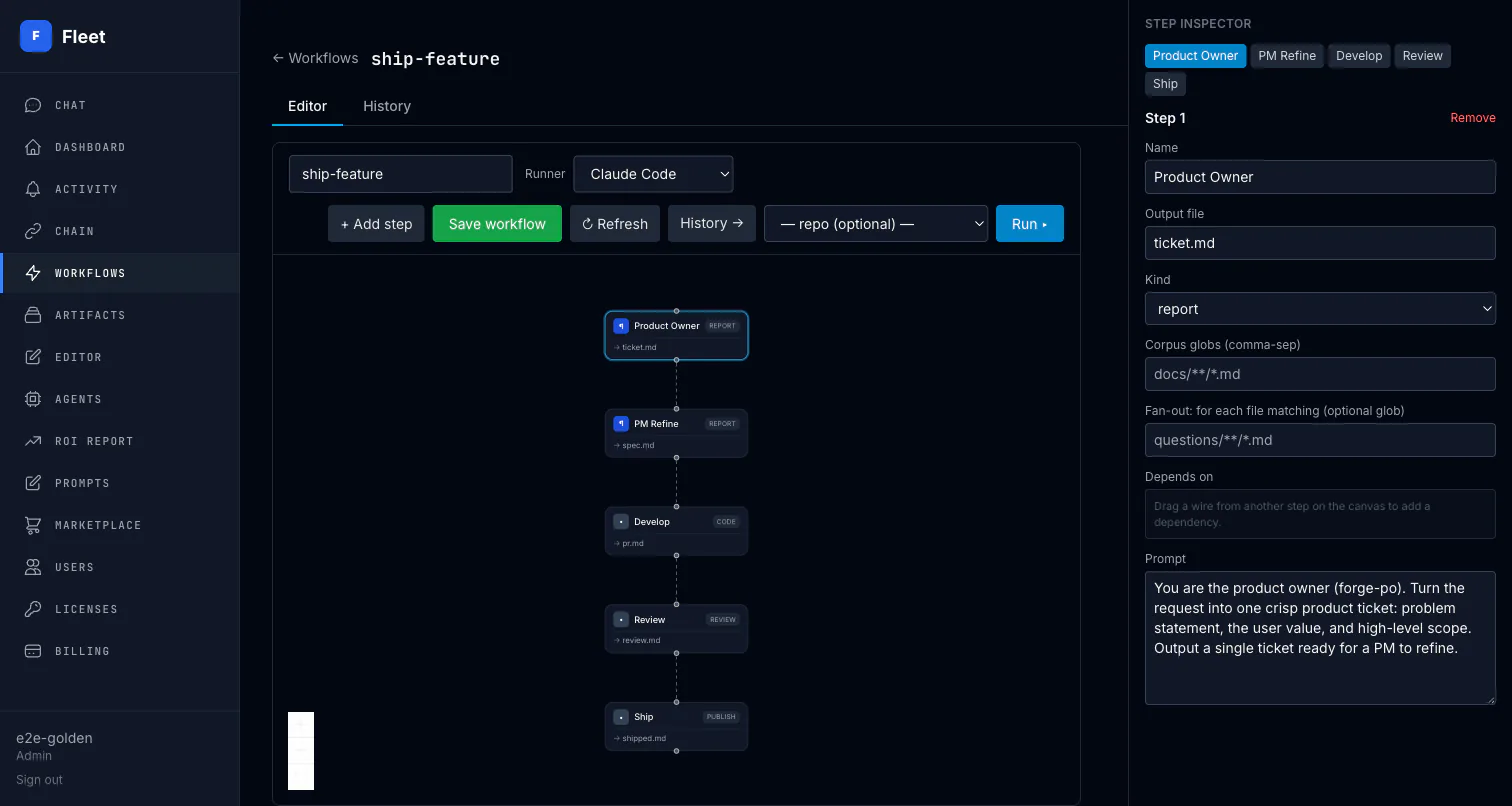
Drag steps together: draft, review, approve, publish. You see which step is running, what it produced, and where it waits for you.
Prefer a guided setup? Read the Fleet documentation.
When a metric is off, start the workflow from that row.
Connect a number you already trust. Fleet ranks which ones are breached or at risk. From that row, run the saved workflow you attached.
Pick a number you already trust
Use a metric from a connected tool, or type one in by hand.
See what is off
Breached and at-risk KPIs sit at the top. Healthy ones stay folded.
Start the workflow from that row
Run the saved workflow you attached, with the current numbers on the run.
The re-prompting problem
You rebuild the same prompt every week.
The output still needs checking.
Same instructions, same pasted context, every time — and the chat window saves neither. When the draft lands, someone still has to fact-check it, route it, and decide it's safe to ship. Fleet saves the prompt as a workflow, pulls context from your files, runs an independent review, and waits for your sign-off.
The same prompt, rebuilt from scratch in a chat window that saved nothing
The real work of a recurring task: re-pasting context the chatbot forgot
Record of who reviewed the output and who approved what shipped
Without Fleet vs. With Fleet
From re-prompting to a saved workflow that ships
The work already runs through AI. The difference is whether it runs through a chat window or through a workflow you can trust.
Without Fleet
- The same prompt rebuilt in a chat window, every single week
- Context re-pasted by hand — and stale the moment the source files change
- Output checked by whoever has time, or not checked at all
- Approval happens in a Slack thread nobody can find later
- Agents run unbounded — no run-time limits, nobody knows what's burning hours
- No record of what was asked, what shipped, or who said yes
With Fleet
- The prompt saved once as a workflow — rerun it, don't rewrite it
- Context pulled fresh from your own files on every run
- An independent review step checks the output before anyone signs
- Approval gates with human sign-off, recorded with name and timestamp
- Per-agent run-time budgets and run tracking across the whole fleet
- Complete audit trail on every run: who proposed, who approved, what shipped
What you get with Fleet
A contained environment for your agents, saved workflows you can watch, and sign-off before anything ships.
Your environment stays yours
Agents run on your computer. They cannot read your keys or open the internet until you allow it. You choose what they can reach, and for how long.
Watch every run
See which step is running, the artifact it wrote, and where a run is parked for sign-off. Replay the timeline later — the audit trail is the product.
Agents That Coordinate Themselves
A saved workflow carries work from development into review, approval, and merge. Labels and schedules start explicit definitions; the graph owns every handoff.
Risk Detection Before Damage
Fleet evaluates every agent across 6 dimensions, and a separate risk model auto-quarantines any agent that hits critical risk — before it becomes an incident.
Works With Your Existing Stack
Fleet runs your agents through Claude Code or OpenCode — including Claude, Codex, Grok, and other models those harnesses support — and plugs into GitHub, Linear, Jira, and MCP. Your developers keep their workflow — you get the governance layer on top.
Permissions That Match Your Team
Mirror your org structure — CEO to intern. Control who sees what, who approves what, and the run-time budgets each team's agents operate under.
Design it. Run it. Watch the gate.
Work stays on your machine. You watch the run. You sign off before anything goes out.
Design
Save the prompt as a typed workflow — draft, review, approve, merge — with the gates where you need a person.
Trigger
Start a run from a label, a schedule, or a button. Context pulls from your files. The work stays on your computer.
Observe
Watch the live timeline. A run parks on approval, records who signed, and keeps every artifact attached to the history.
Official CLI: curl -fsSL https://fleetctl.ai/install | sh · Fleetctl developer resources · OpenAPI
See the config and CLI commands →
Fleetctl for agents and developers
OpenAPI, MCP, CLI, auth, and a no-account sandbox — all on predictable URLs.
Full API documentation — Authentication, Endpoints, and Example requests — lives at Fleetctl developer resources and the agent-facing alias /for-agents/.
Fleetctl documentation
Install the local binary and run governed workflows.
Fleetctl API documentation
Authentication, Endpoints, and Example requests.
Fleetctl API reference
Authentication, JSON errors, MCP transports, and example requests.
OpenAPI specification
Machine-readable operations, typed parameters, and response schemas.
Fleetctl MCP tools
Local stdio and hosted Streamable HTTP MCP for Claude Code, Codex, OpenCode, and other clients.
Fleetctl CLI reference
Official `fleet` binary: install, register, and operate a fleet.
Getting started
Self-serve free tier, registration code, and first local install.
Fleetctl demo sandbox
No-account canned workflow. Jail proof at /security#containment.
What Fleet makes possible
You do not guess from a chat window. You watch a saved workflow run: execution, review, approval, and history on one record.
Steps, retries, artifacts, approvals, and terminal status stay attached to each workflow run.
Flagged work returns through an explicit fix loop, with a defined limit and a human gate available before merge.
Business, per month, with monitored hosted workflow-start allowances and no automatic overage charges. Free to start; Enterprise is custom.
Built for teams that need governance
AI agent fleet management that runs on your infrastructure — the data plane stays with you; the dashboard and analytics live at app.fleetctl.ai. Fleet meets your security and compliance requirements out of the box.
Data sovereignty
Run the model on Bedrock or Vertex in your own cloud. Your source code stays private.
Audit trail
Every agent decision logged — your compliance team will thank you
Run tracking
See cumulative run time, total runs, and last activity for every agent
Role-based access
Mirror your org chart. Department heads see their teams; developers see their repos.
Built for reliability at scale
Installs in seconds. Work stays on your machine. You stay in control.
Keep the next agent inside your environment
Start free. Launch an agent. It stays contained until you let something through. Or book a 15-minute walkthrough.