
Introducing the
Fleet Workflow Builder.
Design multi-step agent workflows on a canvas. Drag steps together, gate them on human approval, and let Fleet run the whole thing — with bounded retries and a full audit trail on every run.
Design workflows in the dashboard; runs execute on your own self-hosted Fleet worker. Human approval gates where you place them, bounded retries, and a full audit trail on every step.
A canvas for work you don’t want to do by hand
Recurring, multi-step work — reports, reviews, questionnaires, living docs — modeled once as a workflow and run on demand, on a schedule, or the moment a ticket is labeled.
Add steps to the canvas and drag connections between them. Dependencies are wired by the edges you draw — rename anything without breaking a link. No YAML to hand-write.
Each step is typed — a document step takes a corpus, an approval step takes a question and approvers, a merge step takes nothing but the upstream PR. The inspector only shows what applies.
Trigger a run manually, on a cron schedule, or automatically when a backlog ticket gets a label. Watch runs and their outputs in the dashboard, with history per workflow.
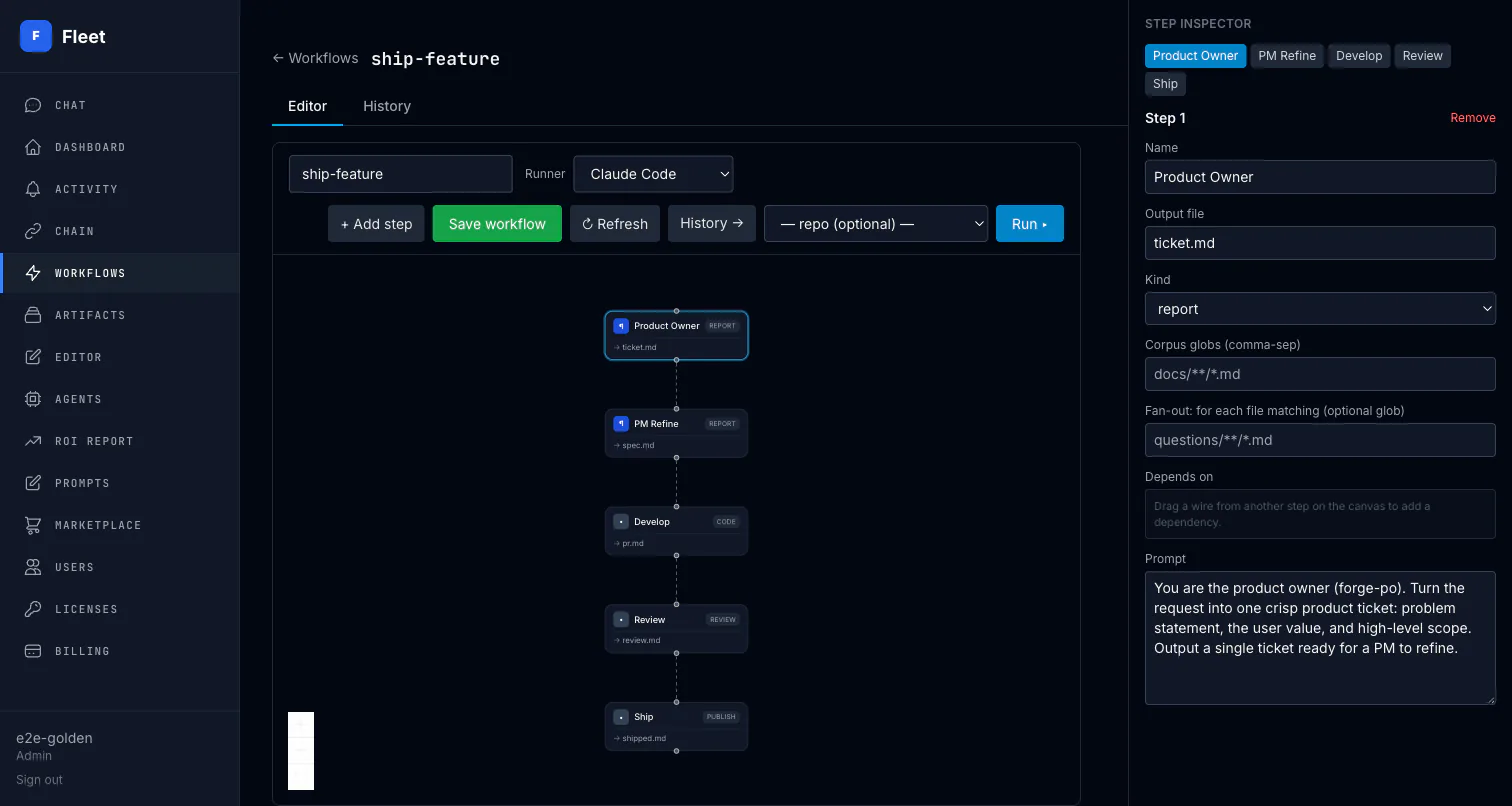
Typed steps, composed into a flow
Typed steps cover document work, coding, review, governance, notification, publishing, and merge. Mix them however the work demands.
Document
Draft a report, dataset, or page from a prompt and a corpus of source files.
Review
Read what flows in and write a findings document — the quality gate before sign-off.
Approval gate
Pause for a human decision. Records who approved, what they saw, and when.
Notify
Send a notification to the people who need to know a step completed.
Publish
Share the approved document as a link — the published output of the workflow.
Code & merge
A coding agent opens a pull request; a governed merge step ships it.
Review, sign-off, and an audit trail — built in, not bolted on.
For work where being wrong costs money, the audit trail and the approval gate are the product.
Human approval gates
Drop an approval step anywhere in the flow. The run pauses, the right people get asked, and the decision — approver, timestamp, what they reviewed — is recorded in the run's provenance.
Every run is an audit trail
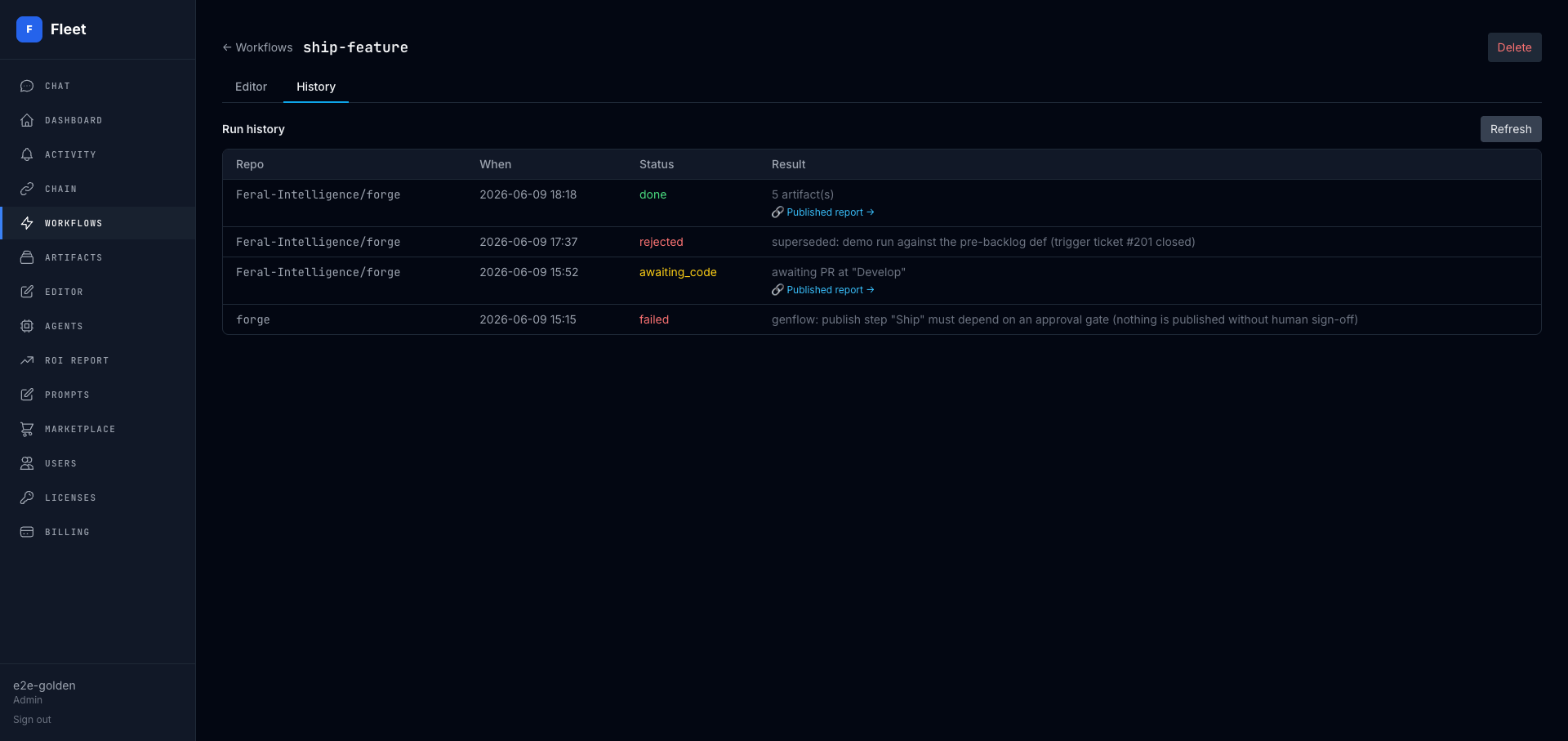
Each step writes a versioned, content-addressed artifact with full lineage. You can answer who proposed, who reviewed, who approved, and what each step actually produced — for any run, any time.
Bounded retries, no runaway loops
When a review flags an output, the workflow routes it back to be redone — but every fail-edge carries a retry ceiling. Exhaust the retries and the run hands off to a notify step instead of looping forever.
Self-hosted execution
You design workflows in the dashboard; runs execute on the locally installed binary, through Claude Code or OpenCode. Your source code and documents stay inside your boundary — run the model on Bedrock, Vertex, or another provider the harness supports.
From canvas to a governed run
Three moving parts: you design, Fleet executes, every step leaves a record.
Design
Lay out steps on the canvas, wire dependencies, set the trigger and the approval gates. Save it — the workflow keeps a stable identity even if you rename it.
Trigger
Run it by hand, on a schedule, or automatically off a ticket label. A label-triggered run is seeded with the ticket that fired it.
Govern
Steps run on your self-hosted Fleet. Approvals pause for sign-off, retries stay bounded, and each step writes a versioned artifact you can audit later.
Workflow Builder, in brief
What is the Fleet Workflow Builder?+
A visual canvas for designing multi-step agent workflows. You drop in typed steps — draft a document, write code, review it, gate it on a human approval, publish or merge it — wire them together by dragging connections, and Fleet runs the workflow on your self-hosted infrastructure.
How is this different from a generic workflow tool?+
Every step is governed. Approval gates pause a run for human sign-off and record who approved it and when. Each run produces a versioned, content-addressed artifact with full lineage. Retries are bounded so loops can't run away. And it's self-hosted — your source code and documents stay in your own boundary.
What kinds of steps can a workflow have?+
Document steps (draft a report, dataset, or page from a prompt and a corpus), code steps that open pull requests, review steps that write findings, approval gates for human sign-off, and notify, publish, and merge steps. Steps are typed: each kind only carries the configuration that applies to it.
How do workflows start?+
Three ways: manually with a run button, on a schedule (cron), or automatically when a backlog ticket gets a label. The label trigger is the autonomous path — tag an issue and the workflow fires a run seeded with that ticket.
Is it available now?+
The visual builder lives in the Fleet dashboard, and runs execute on your own self-hosted Fleet worker. Document, code, review, approval, notify, publish, and merge steps are part of the saved workflow model. See the changelog for changes in your binary version.
Open the builder
Design your first workflow in the dashboard. The binary is free to install; starting agents needs a license you get on sign-up.
Start freeSee it in context
Workflows are how Fleet runs your work — and the same platform coordinates whole fleets of coding agents, with run tracking built in.